Your Code Deserves a Security Expert.
A 100% local AI-powered code security auditor that learns your codebase, generates custom rules, and continuously improves — all without sending a single byte to the cloud.
No Cloud. No Uploads. Ever.
Your code stays on your device. We use local processing for 100% privacy and security.
Flexible AI Options
Choose local Ollama for 100% privacy or use cloud APIs (OpenAI, Claude, Gemini, Groq) with automatic fallback. Your choice, your control.
Active Probing + Static Analysis
Goes beyond linting — includes active XSS probing, dependency scanning, and misconfig detection.
See It In Action
A professional-grade security dashboard, right on your localhost.

Everything You Need
Comprehensive security tools for modern development.
Dynamic Rule Generation
LLM automatically generates custom security rules tailored to your codebase's frameworks and patterns. Rules learn and improve over time.
Lightning Fast Scanning
4-5x faster than v1.2! Parallel LLM processing and smart filtering analyze 50-file projects in just 1-2 minutes. Optimized for speed without sacrificing security quality.
Flexible LLM Providers
Choose between local Ollama (100% private) or cloud APIs (OpenAI, Claude, Gemini, Groq). Automatic fallback ensures scans complete even with network issues.
AI Auto-Remediation
Don't just find bugs, fix them. Generates secure code patches and executive summaries using local LLMs.
Active XSS Probing
Launches a headless browser to verify if XSS vectors are actually exploitable in your running app.
Multi-Language Support
Support for JavaScript, TypeScript, Python, Java, C#, Go, and more with framework-specific rules.
What CodeShield Does NOT Do
We believe in transparency. This tool is optimized for local developer use.
Who Is This For?
Built for those who value privacy and control.
Automated Security in Your Pipeline
Integrate CodeShield into your CI/CD workflow. Scan every PR automatically with GitHub Actions, GitLab CI, or Jenkins.
Scan Every PR
Automatically scan code changes before they're merged. Block PRs with critical vulnerabilities.
Quality Gates
Configure thresholds for critical and high-severity findings. Fail builds automatically.
PR Comments
Automatic security reports posted as PR comments. Team visibility on every finding.
Integrates with your favorite CI/CD platforms
Why CodeShield Local?
| Feature | CodeShield Local | Snyk | SonarQube | OWASP ZAP |
|---|---|---|---|---|
| Runs 100% Locally | Yes | No | No | No |
| AI Auto Fix | Yes | Limited | No | No |
| Active Probing | Yes | No | No | Complex |
| Privacy | ⭐ High | Medium | Medium | High |
| Price | Free / Open | Paid | Paid | Free |
How It Works
Three simple steps to a more secure codebase.
Upload Project
Drag & drop your source code ZIP. We automatically detect languages, frameworks, and structure.
Dynamic Analysis + AI Reasoning
Static analysis runs first, then LLM generates custom rules for your codebase and verifies findings.
Learning + Remediation
System learns from feedback, improves rules, and generates fixes with comprehensive reports.
Your Security Journey
From discovery to daily automated security scanning — here's how teams integrate CodeShield into their workflow.
- Explore features and capabilities
- Review CI/CD integration options
- Choose your platform
- Add workflow file to repository
- Configure environment variables
- Commit and push changes
- Create test pull request
- Watch automated scan run
- Review results in PR comment
- Tune quality gates and thresholds
- Mark false positives
- Enable dynamic rules
- Automatic scans on every PR
- Fix issues before merge
- Seamless security workflow
- Enable caching for speed
- Tighten quality thresholds
- Export/import custom rules
Success Metrics
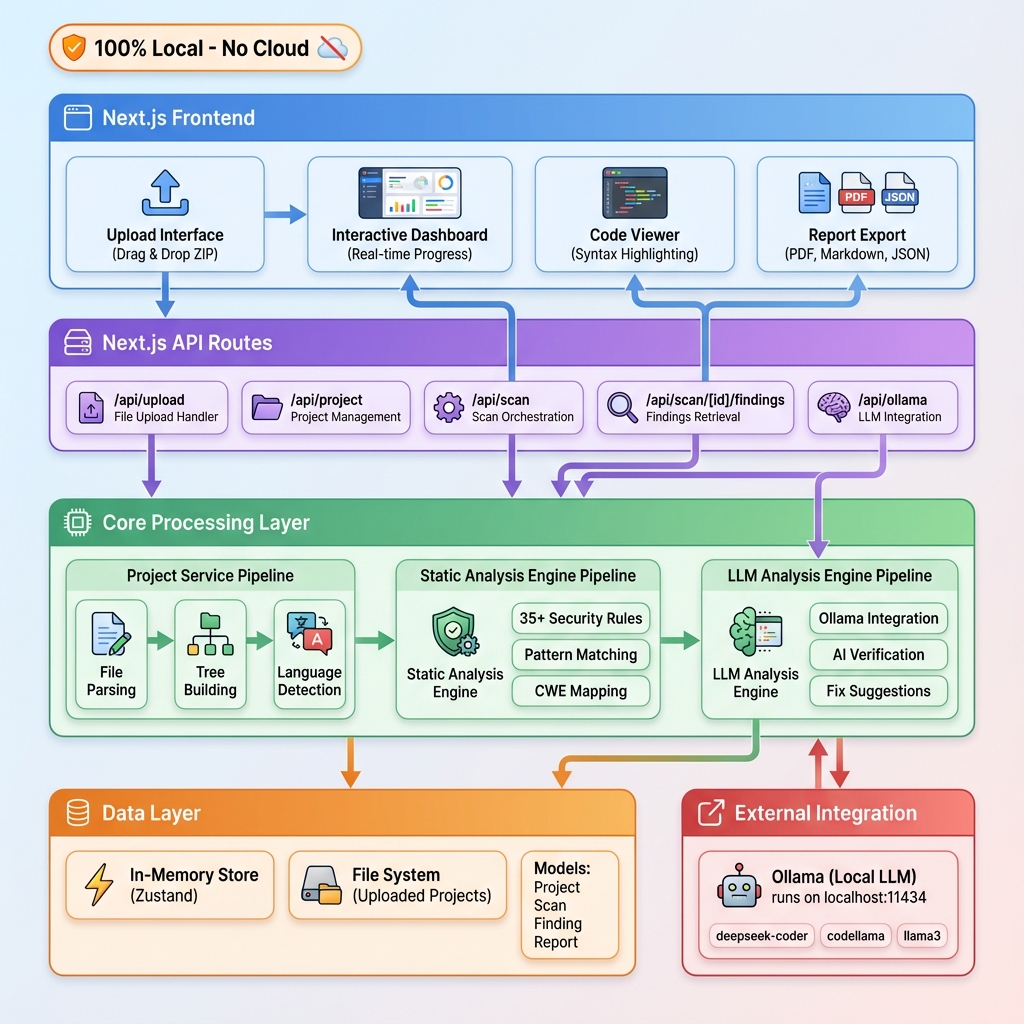
Local-First Architecture
See how data flows securely on your machine.
Frequently Asked Questions
Get in Touch
Have questions or feedback? We'd love to hear from you.
support@codeshield.local